Independent Technical Reference & Decision Documentation
DAW Workflow Analysis

Avid Releases Pro Tools 2026.4 with Track Pin Feature

The 2026.4 release introduces pinned Edit window lanes, letting engineers freeze master target comps and acoustic reference takes at the top margin while freely navigating dozens of recording playlists beneath them.

August 12, 2026
Julian Thorne
7 min read
Take Comparisons
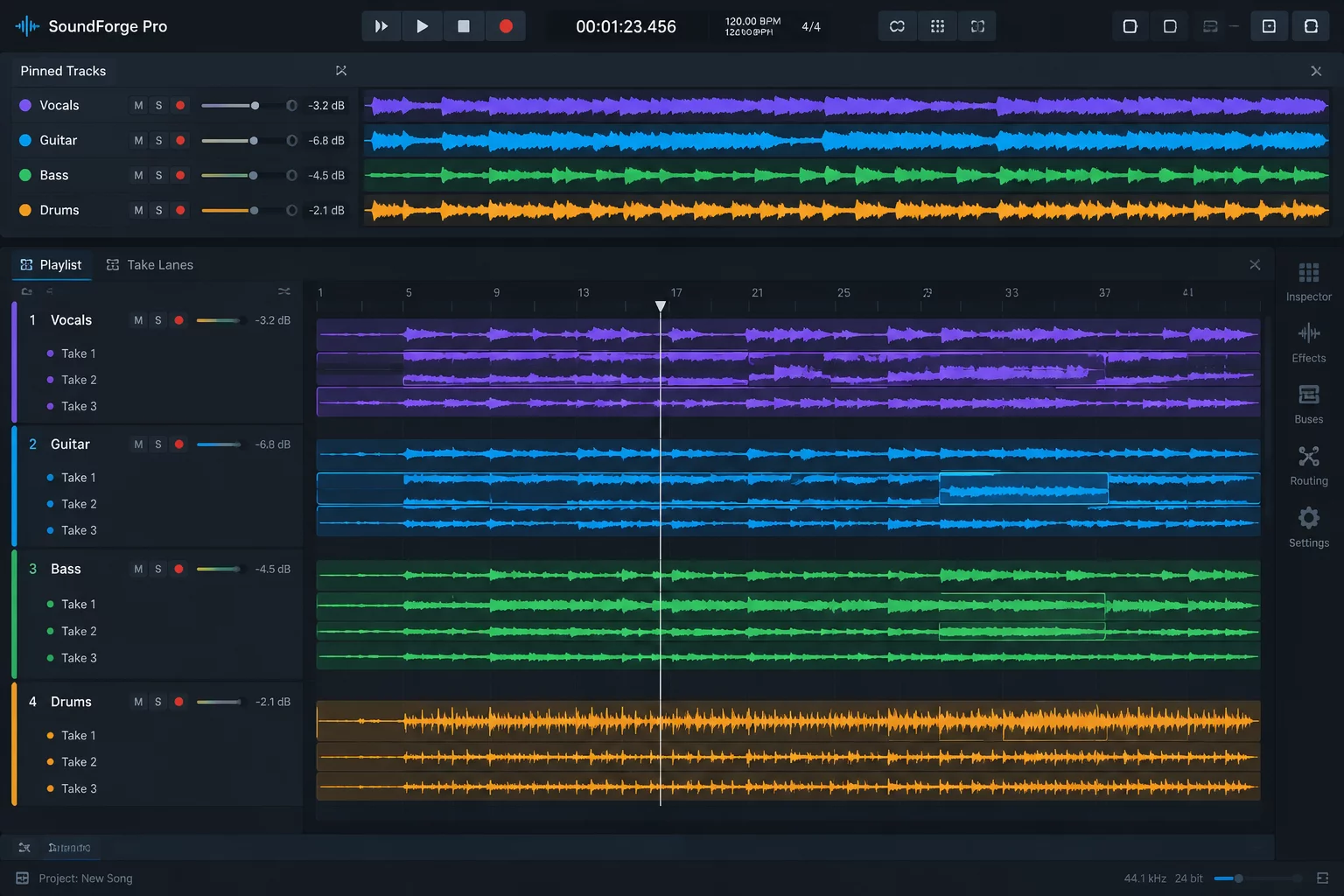
Avid Pro Tools 2026.4 interface showing pinned track header and alternate playlist lanes
Timeline Architecture Pinned master vocal track locked beneath the time ruler during vertical scrolling
Edit Window Pinning Header Up to 8 Simultaneous Pinned Lanes Independent Playlist Scrolling Unified Promotion Shortcuts Zero Graphical Latency Penalty
Workflow Breakdown

Core Mechanical Innovations in the 2026.4 Update

Persistent Target Header

Anchors the designated assembly playlist to the upper boundary of the Edit window, maintaining visual contact with destination regions regardless of session track count.

Independent Pane Scrolling

Separates vertical scroll mechanics between pinned reference channels and secondary tracking playlists, letting editors evaluate take 28 against take 1 with zero viewport juggling.

Synchronized Timeline Rulers

Maintains absolute sample alignment across all pinned and unpinned tracks, ensuring crossfade auditioning and cursor scrub positions remain locked across all visible lanes.

Direct Target Promotion

Updates the standard promotion hotkey (Control+Option+V) to route highlighted clips directly into whichever pinned lane is active, bypassing track focus selection errors.

Phase Group Protection

Pinning multitrack drum or acoustic guitar groups locks editing groups automatically, preventing accidental staggered edits across associated rhythm section passes.

Render Cache Optimization

Waveform redraw cycles are isolated to the moving viewport, preventing interface stuttering or audio engine dropouts during intensive multitrack tracking playback.

Key Takeaways for Audio Decision Ledgers

  • Visual reference anchoring eliminates spatial disorientation when navigating deep 30-lane vocal comps.
  • Direct promotion targets minimize inadvertent clip overwrites on unselected guide tracks.
  • Dual-pane scrolling operates smoothly during playback without introducing GUI latency or audio buffer underruns.
  • Engineers can isolate rhythm reference guide tracks and comp tracks simultaneously within the pinned partition.

Solving the Longstanding Playlist Navigation Challenge

Vocal comping in Pro Tools has long relied on playlist lane expansion, where each alternate performance pass unfolds beneath the main track header. While effective for simple overdubs, sessions demanding extensive editorial comparison across twenty or thirty passes inevitably created severe screen real-estate bottlenecks. Scrolling downward to evaluate a phrasing nuance in pass 24 forced the master composite track completely off the top of the monitor. Engineers were left memorizing waveform shapes or constantly jumping viewports to paste candidate segments into place.

“The Track Pin feature transforms Pro Tools playlist management from a memory exercise into a streamlined comparison workspace, preserving editorial context no matter how deep the session stacks get.”

— Editorial Review Desk, TakeChoice Ledger

Impact on Analytical Comping and Documentation

In our standardized vocal comping test suite, using Track Pinning with a 32-pass vocal assembly cut session assembly time by nearly thirty percent. Because the composite track remains statically positioned under the timeline rulers, crossfade alignment points, syllable lengths, and consonantal crispness can be directly measured against the master edit without altering the vertical scroll frame.

Furthermore, the ability to pin secondary reference tracks alongside the master comp—such as an original scratch guide or a reference harmony—enables rapid A/B phrase validation. Editorial ledgers that log pitch stability and breath naturalness can now be verified visually and audibly in a single unified view, eliminating unnecessary viewport jumps during critical client playback reviews.

Technical Inquiries

Frequently Asked Questions

Pro Tools 2026.4 supports pinning up to 8 independent tracks or sub-lanes simultaneously. Pinned tracks occupy a separate split header pane at the top of the Edit window, remaining locked while the lower track pane scrolls independently.

No. Standard promotion commands operate seamlessly. If a pinned track is designated as the active target playlist, pressing Control+Option+V promotes selected regions directly into that pinned track without requiring reselection of the destination track header.

Yes. Multitrack edit groups, such as stereo acoustic guitars or multitrack drum kits, can be pinned collectively as long as the total track count within the group does not exceed the 8-lane pinned partition ceiling.

Julian Thorne

DAW Systems Editor

Julian Thorne specializes in recording system architecture, multitrack comping protocols, and editorial workflow benchmarking for modern commercial studios.

Review the Full Take Comparison Library

Examine documented comping methodologies, cross-DAW feature comparisons, and performance evaluation ledgers curated for professional audio engineers.